Designing a Scroll-Driven WebGL Journey for My Portfolio
How I connected browser scroll, React Three Fiber, Catmull–Rom camera paths, and real HTML overlays to turn a résumé into a navigable solar system—and why mobile required its own choreography.

Why build an alternate portfolio at all?
My portfolio has two deliberately different ways into the same experience. The homepage is the direct version: a recruiter can scan my work, role progression, tools, and contact information without learning a new interface. The Journey is the alternate version—a scroll-driven trip through a stylized solar system where each stop reveals another part of the résumé.
That separation became the central design decision. The WebGL experience did not need to replace a conventional portfolio or carry every accessibility responsibility by itself. It could instead do one thing well: turn a familiar document into a memorable spatial narrative.
The route starts at Earth, moves past an About stop at Mars, threads through three career cards, opens the complete Work and Notes destinations at Jupiter and Saturn, then uses Uranus and Neptune for selected project spotlights. A final pullback returns the visitor to the normal contact footer.
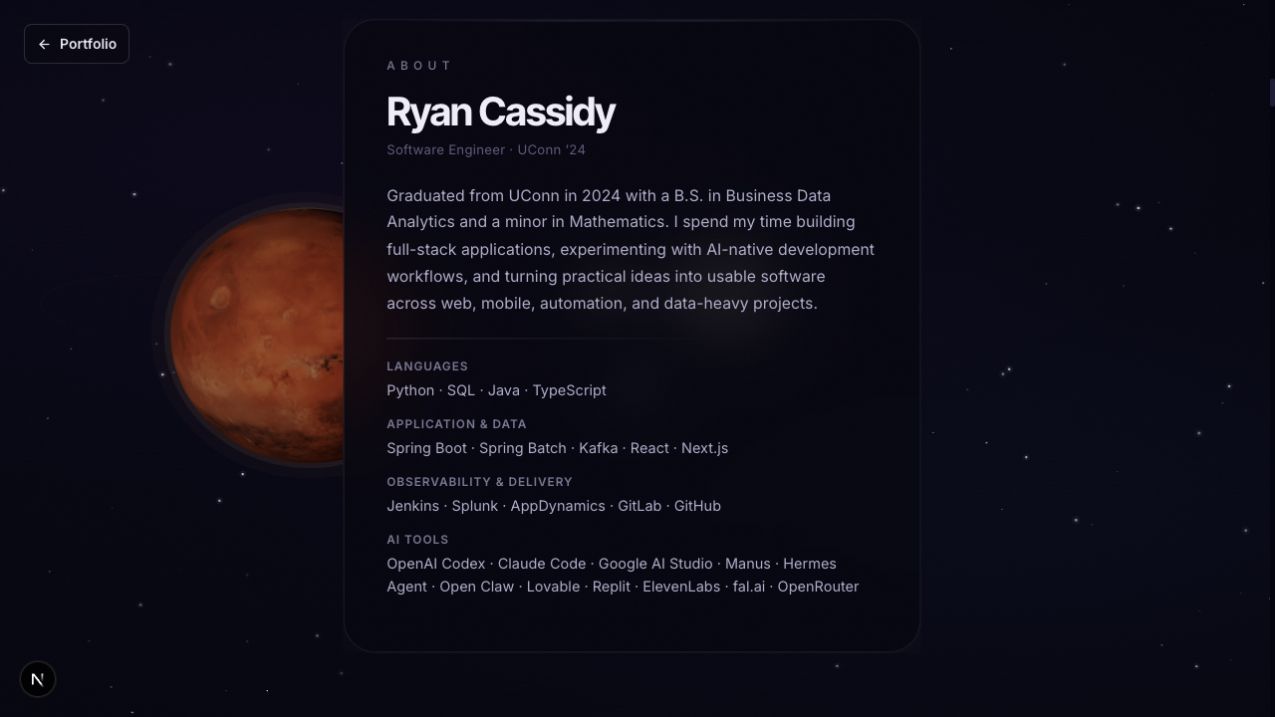 The About panel is anchored near Mars while the camera continues through the portfolio Journey.
The planets are intentionally art-directed rather than scientifically to scale. Their job is to establish rhythm, contrast, and a sense of travel—not to simulate the solar system.
The architecture in one view
The experience is built around one shared value: normalized document progress from 0 to 1.
published project data
        ↓
Next.js server route
        ↓
Journey client experience
        ↓
one GSAP ScrollTrigger progress value
        ↓
mutable ref (no React render on every scroll)
        ↓
desktop or mobile pacing map
        ↓
Catmull–Rom camera path + look path
        ├── planet flybys
        ├── spacecraft position and engine state
        └── 3D-anchored HTML card visibility
The page itself provides distance. It renders a sequence of ordinary, invisible spacer zones whose heights determine how much room each chapter receives. A single ScrollTrigger watches the full document and converts the current position into a stable progress signal.
ScrollTrigger.create({
  trigger: document.body,
  start: 'top top',
  end: 'bottom bottom',
  onUpdate: (self) => {
    scrollRef.current = self.progress
    canvasRef.current?.setProgress(self.progress)
  },
})
That value is written into a ref instead of React state. React does not need to rerender the page dozens of times per second while the visitor scrolls; the React Three Fiber frame loop reads the latest value when it draws the next frame.
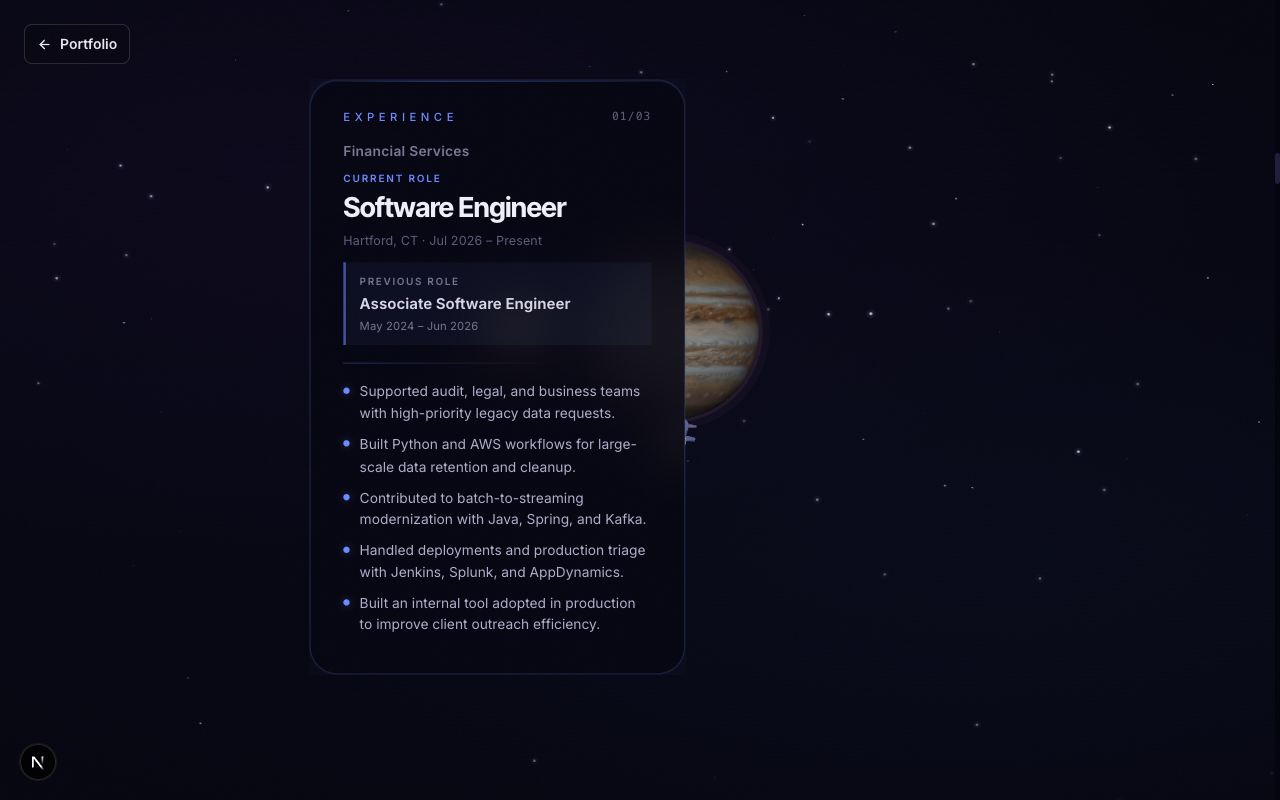 At roughly 20 percent progress, the Financial Services career card and the WebGL scene are driven by the same shared scroll signal.
Separating pacing from camera geometry
A raw scroll percentage is not a good camera director. If 50% scroll simply meant 50% of the camera curve, some planets would pass too quickly, text would appear before the camera was ready, and long stretches of space would feel empty.
The Journey therefore separates pacing from geometry.
- Two piecewise progress maps translate browser scroll into a camera-curve position—one for desktop and another for mobile.
- A Catmull–Rom curve with 37 authored control points determines where the camera travels.
- A second curve determines where the camera looks.
- Position interpolation and quaternion slerp soften movement without disconnecting it from the visitor's scroll.
The maps let the experience dwell near a card, move more quickly between chapters, or reserve extra gesture distance for a mobile flyby without rewriting the physical camera route. This turned out to be much easier to tune than embedding timing assumptions directly into the curve.
The spacecraft follows the same camera curve slightly ahead of the viewer. On mobile, the camera and spacecraft also consume the same smoothed curve parameter. Earlier versions allowed each to converge independently, which made the rocket appear to jitter relative to the camera even when both animations looked smooth in isolation.
WebGL for atmosphere, HTML for information
The scene uses WebGL where it adds something meaningful: planets, stars, lighting, orbital rings, the Sun, and the spacecraft. The résumé cards are not textures painted onto a canvas. They remain real HTML.
React Three Drei's Html component anchors each card to a position in the 3D scene, then portals it into a fixed DOM overlay above the canvas. This gives the composition spatial depth while preserving normal headings, lists, and links.
Each panel has a four-part visibility window:
[fade in, fully visible, begin fade out, fully hidden]
The frame loop calculates opacity from that range and updates the element directly. When a panel is far outside its window, the update is skipped entirely. The WebGL canvas itself is marked as decorative, while calls to action such as “Read notes” or “Read the case study” remain ordinary keyboard-addressable links.
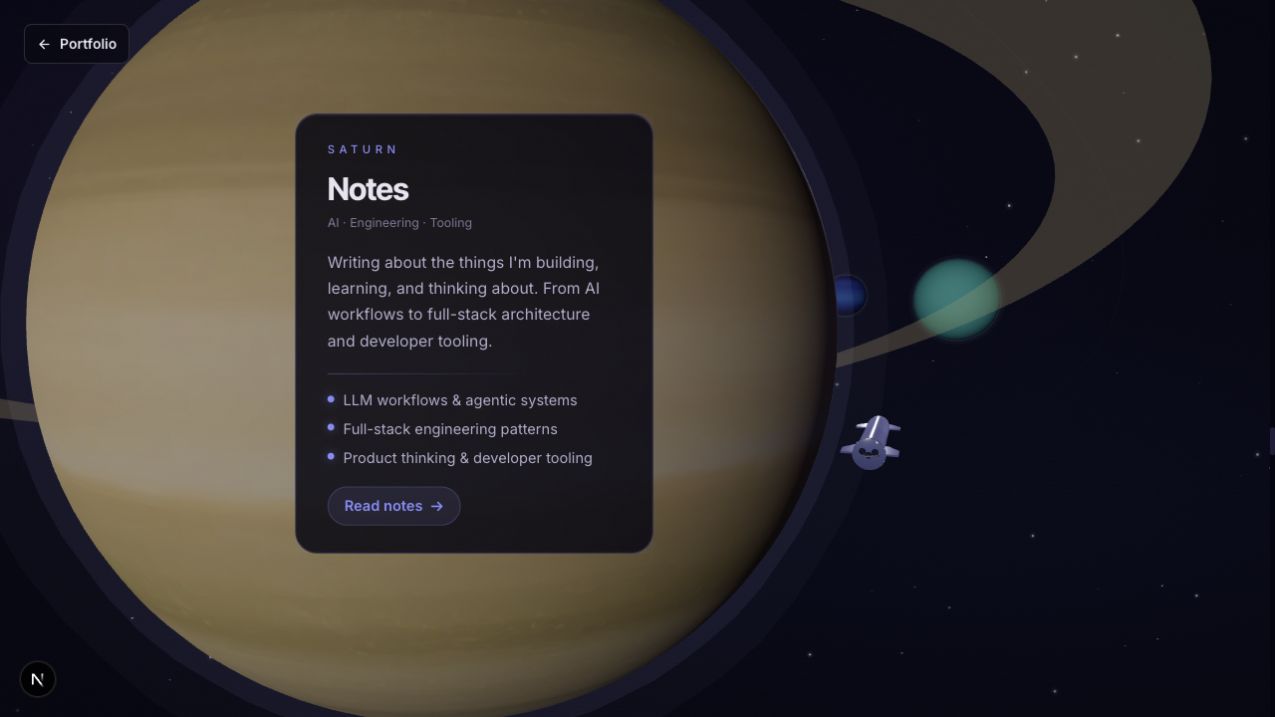 Saturn's rings frame a real HTML Notes panel rather than text rendered into a WebGL texture.
This hybrid approach was more flexible than putting everything into Three.js. Typography stays crisp, content can wrap naturally, links preserve browser behavior, and the database can change a project card without rebuilding a texture atlas.
Making the route content-driven
The Journey page is still part of the portfolio's normal publishing system. The server route loads published projects and resolves two database-managed featured project slots before passing the resulting content into the client scene. Those public reads revalidate every 60 seconds.
The stable résumé narrative—About and Experience—is typed local content. The Work list and featured project cards come from the same project records that power the conventional /work interface. The Saturn Notes card is intentionally an introduction and link to the complete Notes library rather than another article index inside the 3D route.
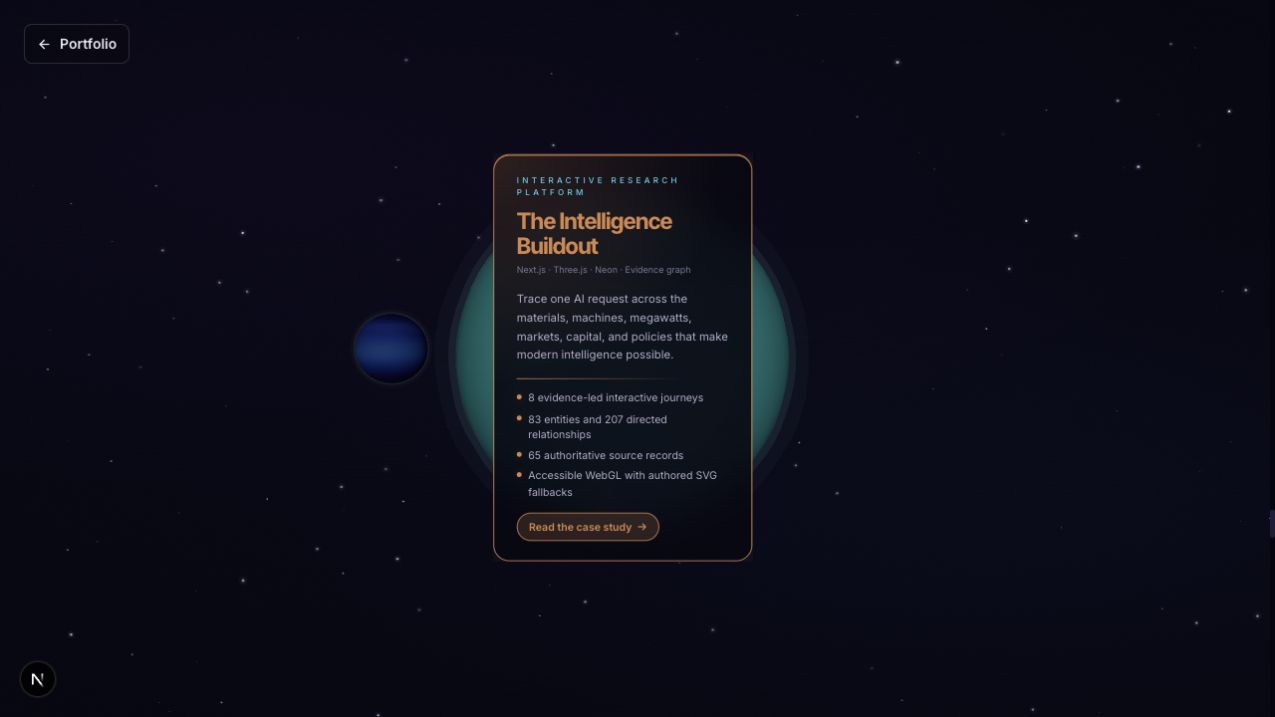 A CMS-selected project card appears during the Uranus flyby without hard-coding the project into the WebGL scene.
That boundary keeps the scene maintainable. The solar-system choreography can remain stable while the projects it highlights continue to evolve.
Mobile was a separate directing problem
The mobile experience is not a uniformly smaller desktop scene. A narrow viewport, shorter swipe gestures, and collapsing browser chrome all change how motion feels.
The mobile path therefore has its own choreography:
- A dedicated progress map gives the three Experience cards equal gesture time.
- Panel visibility ranges are authored specifically for smaller screens.
- The scene compresses the horizontal axis and halves planet radii.
- The outer planets receive additional depth so the camera has room to complete each maneuver.
- Cards use compact layouts and more opaque backgrounds instead of expensive backdrop blur.
Mobile browser address bars created the most subtle problem. When the bar hides, window.innerHeight changes. Viewport-based spacer zones, the canvas, and the renderer can all resize in the middle of a gesture, making the camera appear to jump even though the scroll math is correct.
The fix was to capture the viewport height at mount and use fixed pixel heights for the mobile scroll zones and canvas. Orientation changes are handled separately. ScrollTrigger is also configured to ignore incidental mobile resize events caused by browser chrome.
Performance came from removing work
The most useful optimizations were not exotic shader tricks. They were decisions to stop doing work that the visitor could not see.
- Device-pixel ratio is capped at
1on mobile and between1and1.5on desktop. - Distant planet rotation is skipped on mobile.
- Extra lights and decorative orbital effects are reduced on smaller screens.
- Reusable vectors, matrices, and quaternions avoid garbage collection inside animation frames.
- HTML panels outside their progress windows stop receiving DOM updates.
- A readiness gate waits for the first textured frame before revealing the scene.
- A full-viewport CSS opacity transition was removed after it competed with hero animation and backdrop blur during the first scroll.
One lesson repeated throughout the build: when a WebGL page stutters, the cause may be outside the shader or draw loop. Browser compositing, DOM blur, resizing, and two slightly different smoothing systems can be just as important.
Reduced motion and the next iteration
The Journey detects prefers-reduced-motion and replaces the moving WebGL canvas with a static atmospheric background. The conventional homepage remains the primary, complete résumé experience and requires no 3D interaction.
There is still an improvement I want to make: the reduced-motion Journey should render a complete semantic transcript of every card, not only remove the motion. The current fallback is visually calm, but it does not yet reproduce the entire spatial narrative as a linear document.
That is an important distinction. Detecting a preference is not the same as delivering an equivalent experience.
What I would carry into another WebGL product
The final architecture is specific to this portfolio, but several decisions generalize well:
- Treat scroll progress as application data. Normalize it once and let rendering systems consume it without driving React state on every frame.
- Separate pacing from geometry. A timing map is easier to tune than repeatedly rebuilding a camera curve.
- Keep information in the DOM. Use WebGL for spatial atmosphere and HTML for content, interaction, and accessibility.
- Direct mobile independently. Smaller is not the same as better; gesture distance and browser chrome deserve their own design.
- Share motion state. Objects that must feel synchronized should derive from the same smoothed value.
- Design the conventional path first. An experimental interface works best as an invitation, not a requirement.
The result is less like a page transition and more like a small interactive system. The visitor controls the pace, the camera tells the story, and the content remains connected to the portfolio underneath it.
Explore the interactive Journey or review the source on GitHub.